
The intuitive touch screen is one of the biggest advantages of our automatic labeling machine. Whether you’re a seasoned operator or new to labeling equipment, this guide will walk you through every key function, helping you optimize settings for your specific products and boost production efficiency.
Key Touch Screen Functions Explained
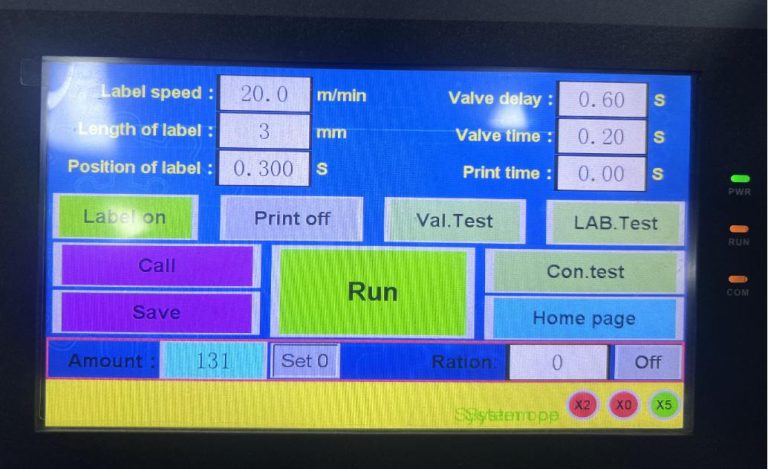
- Home Page: The starting point—switch between languages (Chinese/English) and access all other functions.
- Label Speed: Adjust the speed at which labels are dispensed (measured in m/min). Higher speeds boost productivity for high-volume runs, while lower speeds ensure precision for complex labels.
- Length of Label: Set the exact length of your labels. To calibrate: Set the value to 0 → Click “LAB. Test” → Observe the dispensed label → Gradually increase the value until one full label is dispensed (no more, no less).
- Position of Label: Control the delay interval between bottle detection and label dispensing—critical for ensuring labels are placed in the correct spot (e.g., center of the bottle or aligned with logos).
- Valve Delay & Valve Time: Valve delay is the pause before rollers clamp the bottle; Valve time is how long the rollers hold the bottle (longer for larger labels).
- Save/Call: Save custom settings for different bottle/label types (e.g., “500ml beverage bottle” or “100ml cosmetic jar”) and call them up instantly—saves time when switching production lines.
- Amount & Ration: “Amount” resets the production counter; “Ration” sets a target quantity— the machine stops automatically once reached, preventing overproduction.
- Test/LAB. Test/Con. Test: Troubleshooting tools to test bottle clamping, label dispensing, and conveyor operation separately.
Mastering these functions will help you achieve consistent, professional labeling results every time.
