
Filling accuracy is a key indicator of equipment performance. This equipment provides a filling calibration function. Follow these steps for calibration. First, press and hold the Filling Calibration button to enter the calibration page, which displays relevant settings.
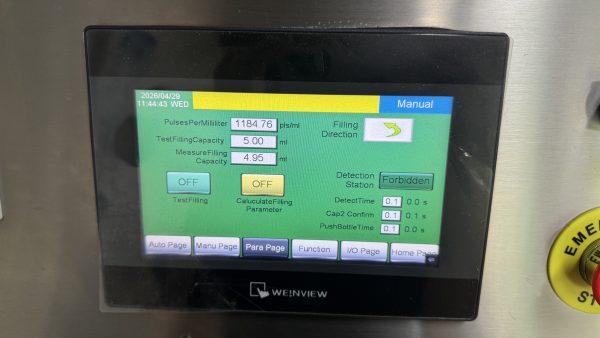
Enter the desired test volume in the Test Filling Capacity field, for example, 10ml. Click Test Filling to perform a test run, then measure the actual filling volume and record it.
Input the measured actual volume into the Measure Filling Capacity field. Click Calculate Filling Parameter, and the system automatically calculates the required pulses per milliliter based on the difference between set and actual values, updating the system accordingly.
Exit the page after calibration. Perform another test fill to confirm accuracy meets requirements. Regular filling calibration ensures long-term high-precision filling and prevents quality issues caused by accuracy deviation.
